Amazing Aurora
- 4.3
- Rating
- 10.00K
- Installs
- Free
- Price

 Analysis by App-foxy
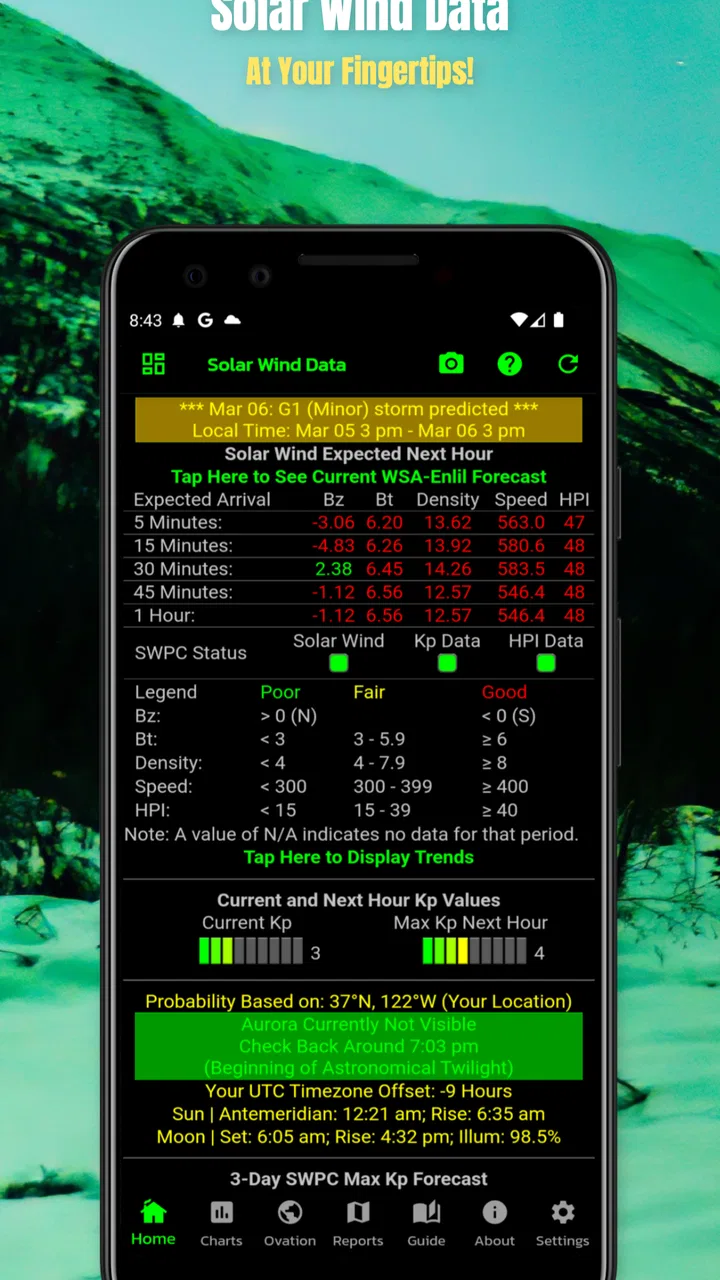
If you have ever looked at a clear night sky and wondered whether the aurora might be visible, Amazing Aurora offers a focused way to begin that check. I reviewed it as a weather app rather than as a general forecast replacement, and that distinction matters. Its purpose is narrow: it provides information about the potential to view the aurora, helping you decide whether checking the sky is worth your time.
The app is free to install, aimed at everyone, and developed by Sharp Rock Ventures. It has attracted over ten thousand installs and holds a 4.3 average from nearly fifty ratings, which suggests a small but generally positive user base. I would not approach it expecting a full weather station, a detailed astronomy suite, or a guaranteed prediction. Its value is in making an aurora-related decision simpler.
From a vague hope to a practical viewing decision
When I’m weighing whether an aurora check should turn into an outing, I find it useful to separate curiosity from commitment: first decide whether the possibility merits a closer look, then consider the practical costs of going out. That keeps a hopeful signal from becoming an automatic plan. The next section looks at how I’d turn that first impression into a sensible viewing decision.
You May Also Like

 Pandora - Music & Podcasts
Pandora’s Music Is Easy to Start, but Harder to Recover
Pandora’s strength is its low-effort path from a seed to a station. Its weak spot is how much confidence it asks you to place in connection, setup, and quiet recovery.

 AccuWeather: Weather Radar
AccuWeather Review: A Quick, Clear Forecast for Everyday Decisions
For everyday plans, the best forecast is the one you can understand quickly. AccuWeather makes rain timing, radar, and local conditions easy to act on, with a few trade-offs.

 Hill Climb Racing
Why Hill Climb Racing Still Turns Crashes Into One More Run
A tiny car, a bumpy hill and one more upgrade: Hill Climb Racing keeps resurfacing because its simple chaos makes every near-miss feel personal.

 AliExpress - Shopping App
AliExpress Makes Global Shopping Feel Personal, but Shoppers Bear the Risk
AliExpress turns a global marketplace into a pocket-sized discovery engine. Its reach is useful, its shopping loop compelling, and its trade-offs easy to miss.

 Lords Mobile: Kingdom Wars
Lords Mobile Is a Kingdom-Building Routine, Not a Quick Match
A case-by-case verdict on the building, battles, device demands, and social commitments that make Lords Mobile rewarding for some players and exhausting for others.

 PDF Scanner app - TapScanner
TapScanner Makes Paperwork Easier to Capture, Check, and Share
TapScanner makes scanning with a phone feel less like a rescue operation and more like a dependable step in getting work done. Its capture tools are useful, though not flawless.
More From Our News Desk
View All News


Starting with the right question
The most useful way to approach this app is to start with a specific situation: you are considering going outside, driving to a darker place, or setting an alarm for later, and you want an indication of whether an aurora viewing attempt has potential. That is more realistic than opening it and expecting it to tell you exactly what will happen above your house.
In my experience, this narrow starting point makes the app easier to understand. A normal weather app answers questions about rain, temperature, wind, and cloud cover. Amazing Aurora is concerned with a different kind of possibility. It helps frame the question, “Is there enough reason to watch the sky?” rather than pretending that a yes-or-no answer can guarantee a visible display.
That difference is important because aurora viewing depends on several conditions working together. Even when activity looks promising, clouds, nearby lighting, the time of night, and your distance from a suitable viewing spot can change the outcome. I treat the app as an initial filter, not as the final authority.
Reading the information without overpromising
The strongest habit is to use the app before making plans, then combine its indication with what you can observe locally. If the potential looks encouraging, I would check the ordinary weather forecast next, look for a reasonably dark location, and consider whether the sky will actually be clear. This two-stage workflow is more dependable than relying on any single screen.
That is also where the app feels different from usual weather alternatives. A standard forecast application may give you more information overall, but it usually makes you assemble the aurora decision yourself. Amazing Aurora puts the aurora question first. For a casual observer, that focus can be more useful than scrolling through unrelated weather panels.
On the other hand, someone who needs detailed cloud layers, radar, wind direction, or a broad forecast will probably still need another app. I would not replace a familiar weather tool with this one. I would use it beside one, especially when planning an evening outdoors.
A simple step-by-step workflow
My suggested routine begins earlier in the day. Open the app when you first start thinking about viewing the aurora, rather than waiting until you are already outside. Use the information as a reason to continue investigating, not as a promise that the sky will light up.
Check the aurora potential in Amazing Aurora.
Compare that impression with the local forecast and expected cloud conditions.
Choose a location with a broad view and less artificial light if the conditions justify going out.
Give your eyes time to adjust instead of judging the sky immediately after leaving a bright room or car.
Recheck the situation before committing to a longer trip or staying out late.
The practical insight here is that the app works best as a decision gate. It can help you decide whether to investigate further, but it should not be the only reason you spend money on travel or rearrange your evening. That small change in mindset prevents disappointment and makes the app more useful.
The handoff to other tools and people
Aurora viewing often involves a handoff. One person checks the potential, another checks the clouds, and someone else may choose the location or decide whether the trip is worthwhile. Amazing Aurora fits neatly into the first handoff because its information is easy to discuss: it gives the group a reason to continue or pause.
For a family, that could mean checking before getting children dressed for a late outing. For friends, it could mean using the app before deciding who is willing to drive. For a photographer, it could be the first step before preparing equipment. In each case, the app reduces the amount of guesswork at the beginning, while the final decision still depends on local circumstances.
I especially like this workflow for people who do not follow aurora activity regularly. A specialist may already know which other indicators to examine, but a newcomer can start with one focused question. The app lowers the barrier to making that first check without requiring the user to understand every technical detail behind aurora forecasting.
There is a trade-off, though. A focused app can make a process feel simpler while leaving important context elsewhere. If you share its indication with someone planning the outing, I would also mention the cloud forecast and the viewing location. Passing along only the optimistic part can create unrealistic expectations.
What the result actually tells you
The outcome I want from this app is not a perfect prediction. It is a clearer choice between three actions: keep watching, prepare for a possible outing, or leave the idea for another night. That is a modest result, but it is useful when the alternative is repeatedly checking several unrelated sources without knowing what matters.
A promising indication can justify checking a darker location or waiting for a better viewing window. A weak indication can save time, fuel, and frustration. Neither result guarantees success, and that is the central limitation users should understand before installing it.
The app is therefore best for casual skywatchers, people planning an occasional aurora trip, families who want a simple starting point, and anyone who prefers a dedicated screen over a general-purpose weather dashboard. It is less suitable for experienced observers who need extensive astronomy data in one place or for users who want detailed everyday forecasting.
Where the workflow breaks down
The first weak point is the gap between potential and visibility. An encouraging result may still lead to an ordinary-looking sky because local clouds or light pollution hide the aurora. This is not a defect unique to the app; it is a basic limitation of turning a large, changing natural event into a convenient mobile indication. Still, new users may need time to learn not to read the result as a guarantee.
The second issue is that the app’s narrow focus can become inconvenient when the viewing decision depends on information outside it. You may need to switch to another weather service, map, or astronomy resource before leaving home. That extra handoff is manageable, but it means Amazing Aurora is a companion tool rather than a complete planning system.
The third friction concerns expectations around updates and versions. The current version is 12.1.2 and it supports devices running Android 7.0 or newer. That makes it accessible to many Android users, but anyone with an older phone should check compatibility before planning around it. I also see the version detail as a reminder to keep the app updated when possible, particularly for a subject where timely information matters.
There are optional in-app purchases ranging from ninety-nine cents to nearly fifteen dollars per item. The app itself is free, which makes trying it low-risk, but I would look carefully at what any optional purchase provides before paying. For a casual user who only wants an occasional indication, the free starting point may be enough. Someone who uses it frequently should decide whether the extra value fits their routine rather than assuming every paid option is necessary.
How it compares with a normal weather app
A general weather app is the better first choice if your main concern is whether it will rain, how cold the night will be, or whether wind will make an outdoor trip uncomfortable. Those apps usually cover the practical conditions that determine whether you can stay outside comfortably.
Amazing Aurora is better when the aurora itself is the reason you are checking your phone. Its advantage is concentration: it avoids making you interpret ordinary forecast information as a possible aurora signal. For a beginner, that can feel much clearer than searching through a broad weather interface.
The best setup is not either-or. I would use Amazing Aurora to decide whether the aurora is worth investigating, then use a familiar forecast app to judge whether the local sky and outdoor conditions support the plan. That combination acknowledges both the app’s strength and its boundary.
Who should install it, and who should skip it
I would recommend trying it if you live in, or travel to, an area where aurora viewing is realistic and you want a quick way to decide whether to look up from your evening routine. It is also a sensible choice for first-time viewers who do not want to begin with complicated astronomy tools.
I would skip it if you are looking for a complete weather replacement, a detailed stargazing planner, or a tool that can promise exactly when and where the aurora will appear. It may also feel unnecessary if you already have a trusted aurora workflow and prefer to combine several specialist sources manually.
For occasional users, the free price and Everyone content rating make the app easy to test without much commitment. Its relatively small audience means I would judge it by whether its focused workflow suits you, not by popularity alone. The 4.3 average is encouraging, but the experience will still depend heavily on your location, expectations, and willingness to verify conditions elsewhere.
My practical verdict after using the workflow
Amazing Aurora succeeds when I treat it as the first step in a viewing plan. It turns a vague impulse—“maybe I should check for the aurora tonight”—into a quick prompt to investigate. That is its real strength, and it is more useful than the short description might suggest because it fits naturally into decisions about travel, timing, and whether to wake other people up for a late-night look.
Its weaknesses are equally clear. It does not remove the uncertainty of nature, and it does not replace the ordinary weather information needed for a comfortable and realistic outing. The need to hand off to other tools can frustrate users who expect one complete dashboard, while optional purchases deserve a careful look before spending.
My recommendation is simple: install it if the aurora is the specific reason you are opening a weather app. Check it early, confirm the local sky separately, and use the result to decide whether further effort makes sense. Used that way, this free app from Sharp Rock Ventures is a focused and approachable companion for turning aurora curiosity into a sensible viewing attempt.
A low-effort check for a shared evening
One practical household routine is to make the app check before anyone changes plans. Imagine a clear evening when a child asks whether the family can look for the aurora, but the adults have an early start the next day. I would check the indication first, then confirm cloud conditions and decide together whether a short look close to home is sensible. That avoids turning a hopeful question into an unnecessary late drive.
For a shared phone, I would keep the decision-making simple: whoever checks should pass along the result and the reason for the next step, rather than handing over the device and expecting everyone to interpret it. The app does not need to become a family command center; it is just a useful conversation starter. Household members can still use their own weather tools or preferences for the parts that matter to them.
Keep expectations and accounts in perspective
Because an aurora check can influence a late outing, I would treat the app as something an adult can consult with younger viewers, not as a promise children should plan their night around. Its Everyone age rating makes it broadly suitable, but the natural uncertainty remains: a positive indication cannot guarantee a sighting. Setting that expectation beforehand makes a cloudy or quiet night easier to accept.
I would also avoid assuming that a shared device means every household member has the same needs or settings. The app can be one person’s quick check while another person verifies the forecast or handles directions separately. If you are considering an optional purchase, decide as a household whether it is useful to the person who will actually use it; the free app is a reasonable way to try the basic workflow first.
Overall, I see Amazing Aurora as a practical shared starting point, not a family planner or an all-in-one sky guide. It suits households that want to make an informed, low-pressure decision about looking outside. If your household needs detailed forecasts, coordinated alerts, or a complete astronomy setup, a broader set of tools will serve that purpose better.
FAQs for Amazing Aurora
01What is Amazing Aurora, and what can I do with it?
Amazing Aurora is an app focused on viewing and exploring aurora borealis activity. It is designed to help users discover where auroras may be visible, understand current space-weather conditions, and follow forecasts or alerts. The experience is most useful for travelers, photographers, and anyone interested in natural phenomena, although actual visibility depends on location, weather, darkness, and solar activity.
02Does Amazing Aurora require an internet connection or location access?
An internet connection is generally important because aurora forecasts, solar activity information, weather details, maps, and notifications may need to be updated from online services. Location access can also improve the accuracy of regional predictions and nearby viewing recommendations. Users who prefer greater privacy can usually review or limit permissions, but restricting location access may reduce the app’s usefulness.
03Can Amazing Aurora guarantee that I will see the Northern Lights?
No aurora application can guarantee a sighting. Amazing Aurora can provide forecasts, activity indicators, and alerts, but auroras are unpredictable and depend on several factors, including solar wind strength, cloud cover, light pollution, moonlight, local visibility, and your exact position. Treat the information as guidance rather than a promise, and check local weather conditions before planning a trip.
04Is Amazing Aurora free to download, and are there in-app purchases?
The app may be available to download at no initial cost, but some features can depend on the version offered through the Android or iOS store. Advanced forecasts, extended historical information, advertising removal, premium alerts, or additional tools may require an in-app purchase or subscription. Before confirming a purchase, review the store listing for current pricing and renewal terms.
05Is Amazing Aurora suitable for beginners and aurora photographers?
Amazing Aurora can be useful for both beginners and experienced observers because it brings aurora-related information into one mobile interface. Beginners may appreciate straightforward activity guidance and alerts, while photographers can use forecasts to plan outings. However, the app does not replace practical preparation: bring suitable clothing, protect your phone battery, use a tripod when needed, and choose a dark viewing location.
Pros
- Stunning aurora visuals create a relaxing and immersive experience.
- Simple interface makes exploring forecasts and sightings easy.
- Useful location-based information helps identify viewing opportunities.
- Regular updates can improve forecast accuracy and app performance.
- Suitable for both casual viewers and dedicated aurora enthusiasts.
Cons
- Aurora visibility depends heavily on weather and local light pollution.
- Some features may require an internet connection or location access.
- Forecast accuracy can vary during rapidly changing solar conditions.
- Frequent alerts may feel excessive if notification settings are not adjusted.
- The app may offer limited value in areas with rare aurora activity.

Amazing Aurora
Gallery